

 Always wanted to make a font based on your own handwriting, but didn't know how? Well, here is a tutorial that explains how to convert your handwriting into a personal font.
Besides a computer running Microsoft Windows you will need the following equipment:
- template character set (click here to download)
- software (e.g. Adobe Reader) to open and print the template
- marker (dark, preferably black)
- printer
- scanner
- image processing software (Microsoft Paint will do)
- FontCreator (download FontCreator from High-Logic)
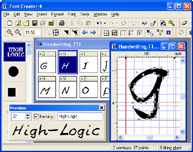 The font editor used in this tutorial is FontCreator from High-Logic. Font Creator has an intuitive interface that allows beginners to become productive immediately and it contains the powerful drawing tools that font designers require to create and edit high-quality TrueType and OpenType fonts. The home edition costs $99.00 and has all the features you need to make your own fonts.
Other font editors that can be used to make your own fonts are ScanFont and Fontographer. Fontographer has no demo and hasn't been updated for over a decade, but you can still buy it for $349.00. ScanFont costs $99.00 and has a demo, but it will only work if you've also installed either TypeTool ($99.00), FontLab Studio ($649.00) or AsiaFont Studio ($1999.00), but the demo produces crippled fonts.
Now go make your own font. It takes at least an hour to complete your first font, but it will be worth it. Start the Tutorial.